Friday, July 22, 2016

Learning Android: Installing an APK to the Android Emulator on Windows

I've started to learn some Android development by following a course on Udemy. One of the apps involved using the YouTube API, but I didn't realize at first that the API relies on the YouTube app being installed on the Android device. The Android emulator doesn't come with that, nor the Google Play Store so it is a little bit of a pain to get it setup. However, this is what I figured out:
  • First get the YouTube APK from here: http://www.apkmirror.com/apk/google-inc/youtube/
  • I chose the latest release, then picked the 480dpi version for x86. You might want x86_64 depending on how you setup your Android Virtual Device.
  • You need to use the "adb" command line tool which comes with the Android SDK. To find it, using Android Studio click "File->Settings."
  • Go to "Appearance & Behavior->System Settings->Android SDK"
  • Near the top is the "Android SDK Location", e.g. "C:\Users\\AppData\Local\Android\Sdk"
  • Now you can use the Terminal tab in Android Studio and change to the "platform-tools" folder within the SDK directory, e.g.
    "cd C:\Users\\AppData\Local\Android\sdk\platform-tools"
  • Also copy the YouTube APK to that folder to make the command easier to run.
  • Then you can run: "adb install youtube.apk"

FWIW I also added some code to my YouTubeActivity.java to make it a little nicer on the user having a problem:

    @Override
    public void onInitializationFailure(YouTubePlayer.Provider provider, YouTubeInitializationResult youTubeInitializationResult) {
        youTubeInitializationResult.getErrorDialog(YouTubeActivity.this, 0).show();
    }


Although since the Google Play Store isn't installed on the emulator the error dialog isn't as useful as it could be, since it directs you to install the app via a button click, but it at least tells you why the app isn't working.

I also had a fatal exception after that, without any really useful error, but I hadn't added the INTERNET permission to my app so it all worked after that.

Monday, February 22, 2016

VR for Beginners: Cardboard, Unity and iOS - Part 2

Update 23-May: Note that the Cardboard SDK has now been replaced with the GoogleVR SDK. In most cases you can simply replace Cardboard with GoogleVR or GVR in the text below. There may be some steps below that are no longer needed, (e.g. some of the XCode steps are already done for you, like disabling Bitcode and including security.framework.)
 
I posted on this subject before, but back then Google didn't officially support iOS with their Cardboard SDK. That has changed, so things are a little easier now. Yesterday I decided to try it out and figured I'd share what I learned.

What I'm going to cover:

  • I'll point to a simple tutorial to build a quick 3D game. We'll be extending this a little too.
  • From there we'll convert that game to support VR mode using Cardboard.
  • We'll add the VR camera.
  • We'll add some interaction to the scene using gaze and clicks.
  • We'll add some UI, including HUD and 3D buttons.
  • We'll add support to switch between regular and VR modes.
  • Finally, we'll build through XCode to get it running on an iPhone.
    • You could do these steps earlier to try things out on your phone at each stage, but I just used the built-in Unity player in the IDE most of the time since it takes a while to build.

Prerequisites/My setup:

  • I'm using the latest of everything at time of writing
  • A Macbook Pro, (El Capitan,) and an iPhone 6S, (9.2.1)
  • Unity 5.3.2 (Download and install this, making sure to install the iOS features.)
  • Cardboard SDK v0.6 (Download this. We'll add it to our project shortly.)
  • XCode 7.2.1

Getting setup and adding a VR camera

Unity offer a tutorial on their website for absolute beginners to learn about Unity fundamentals while making a very basic 3D game, Roll-a-ball. We'll be building from this, so I highly recommend following each stage of that tutorial if you are a beginner to become familiar with the terminology, interface, game structure, etc. But if you don't want to do that, I've uploaded the base project to GitHub, along with the final result from the tutorial below.
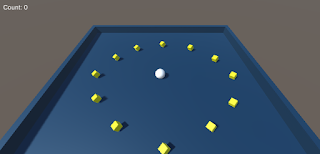
Roll-a-Ball
Copy the Roll-a-Ball project folder and name it Roll-a-Ball VR. Open the project in Unity.
Import the Cardboard SDK: Go to Assets > Import Package > Custom Package. Select the CardboardSDKForUnity unitypackage where you downloaded it and click Open. Since we are using Unity 5 we can uncheck any items marked Legacy. Notice the Cardboard and Plugins folders are added to your project.
Delete the Main Camera item in your project hierarchy, (note that this means our CameraController script that we wrote as part of the Unity tutorial is no longer used.) Replace your camera by dragging Cardboard > Prefabs > CardboardMain from your project view to the scene hierarchy. Set the position of CardboardMain to (x,y,z)=(0,10,-10) and rotation x=45 to get it to the same spot as our old camera. In your hierarchy select CardboardMain > Head > Main Camera, then set Clear Flags = Skybox in the inspector.
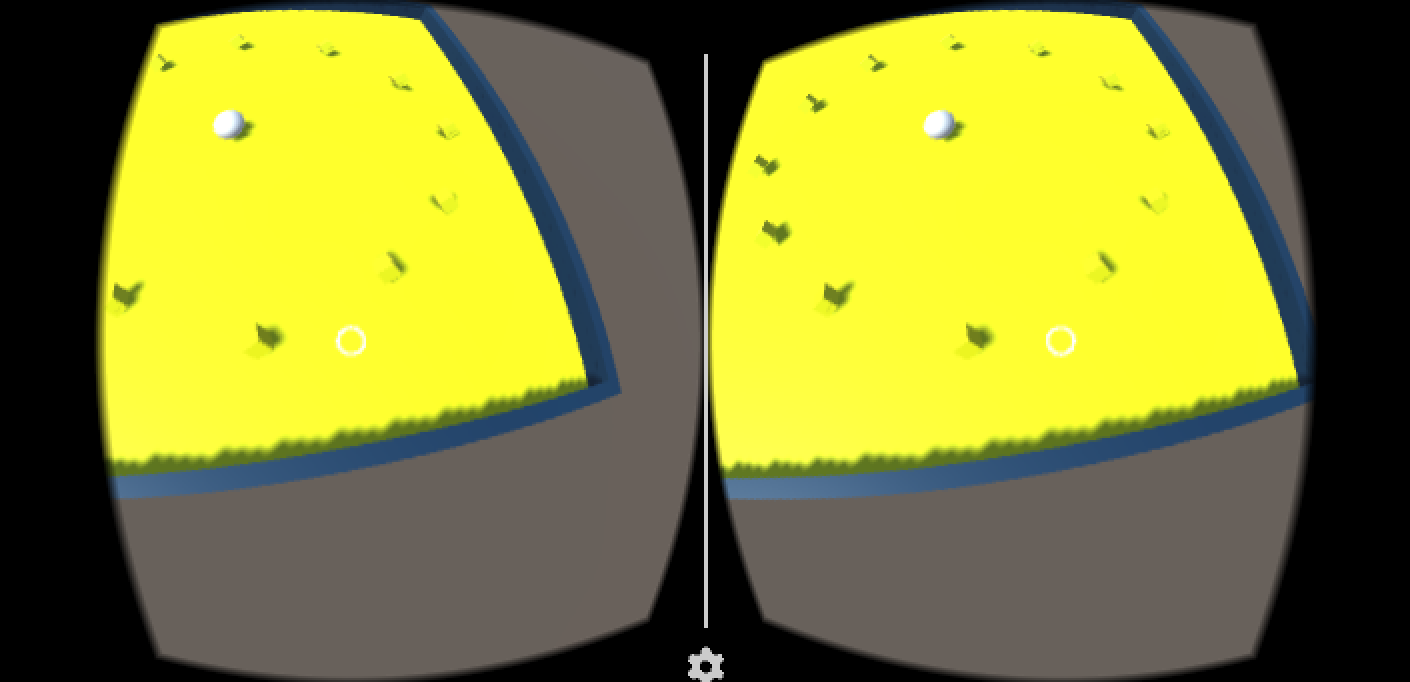
Press Play, and you should see the game view showing a stereo rendering of the Roll-a-Ball board. While in play mode, press Alt and move the mouse around to pan horizontally and vertically to simulate moving your head around. Use Ctrl to simulate tilting your head from side to side. Your keyboard arrow keys or gamepad directional buttons will still work to move the ball around too.
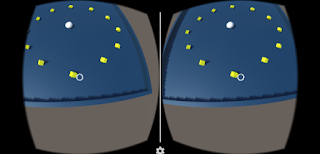
Roll-a-Ball in VR!

Adding Interaction

We're going to add the ability to interact with the game world by just looking at it. In the hierarchy select the Event System and add a Script component Cardboard > GazeInputModule. Make sure to move this component above any other input components in the inspector, (you can use the cog button next to the component's name.) In our case, we need to move Gaze Input Module up once, above Standalone Input Module. Also in the inspector, check VR Mode Only.
Next select CardboardMain > Head > Main Camera in the hierarchy and add a component Event > PhysicsRayCaster, (note, make sure not to pick a Physics 2D Ray Caster.) This will project rays from the camera into the world so we can detect collisions with the object you are looking at and react.
Now we want something to happen in response to our gaze. We'll do something simple to start with to prove things are working, switching the colour of the ground. In the hierarchy select Ground and add an Event > Event Trigger component. Within that component click the button to Add New Event Type, OnPointerEnter, and set MeshRender.material to Pick Up. Do the same for OnPointerExit to have the material change back to Background.
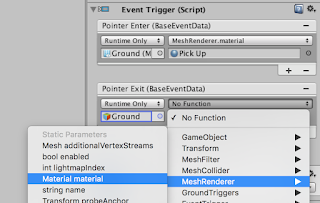
Setting up the Event Trigger

Click play and try looking around. If you have part of the ground in the middle of your view you should notice it change colour. Look away and it should change back. You may notice some flicker. Lets see if we can find out why.
To make it easier to see what we are pointing at we are going to add a reticule to our view. In the project we'll drag Cardboard > Prefabs > UI > CardboardReticule to under CardboardMain > Head > Main Camera in the hierarchy. If you click play again you should notice a white point in the middle of the screen which changes size as it approaches objects. You should also now see that the ground doesn't change colour when we are pointing at some object in the way, (e.g. the player ball or pick ups.)
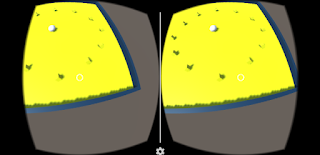
Look at the ground to change the colour

Now let's remove that Event Trigger component so we can add something more useful in a moment.

UI in VR

Where did our UI go from the original tutorial? You may notice it is still displayed at the top left of the screen in the Game view, but we wouldn't see that when wearing our Cardboard device. So we need to make it part of the 3D world. Unity have a doc explaining more about this. Select Canvas in the hierarchy and see the Canvas component in the inspector. Set the Render Mode to World Space and set Event Camera to Main Camera. Now in the Scene view if you just zoom out you should see a large rectangle, which is our UI canvas. We need to move it to a more reasonable/useful position. In the inspector set the position to (x,y,z)=(0,2,0), size to (128,128), rotation to x=90, scale to (x,y,z)=(0.1,0.1,1). Select Canvas > Count Text in the hierarchy and change the Anchor Preset from top-left to top-center, (hold Shift and Ctrl when clicking.) Change the Paragraph Alignment to Center. Note I've removed the Win Text from the tutorial and just use the Count Text to show the win message, which you can see in a script a little later in this post.
Click play and you should see the player's score hovering above the game board.
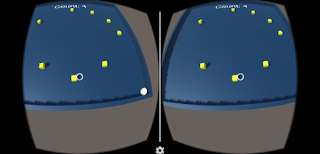
Diegetic UI Image (in-world UI)
That text is diegetic UI, (in-world UI,) there at the top
For fun, put the Canvas object under CardboardMain > Head in the hierarchy. If you play now you should see that the UI follows the player's gaze, like a HUD. While this is a badly positioned example, it should give you the idea if you wanted to try this again in future. For now, move the Canvas back to the root of the scene hierarchy.
We're going to add a button and some script in order to reset the game board which pops up once the player has collected all of the pick-ups. So select the Canvas and from the main menu click GameObject > UI > Button. Position it somewhere appropriate within the canvas, (I went for a bottom-center anchor preset.) Name this button Play Again Button and set a Highlighted colour. Now click to disable it, (top-left checkbox of the inspector.)
On the Canvas object we'll add a New Script component in C#. Call it GameplayMenu. Very simply, we just need one function here:
// Reset the game and start again
public void PlayAgain () {
  UnityEngine.SceneManagement.SceneManager.LoadScene ("MiniGame");
}
Save the file and go back to Unity. Select the Play Again Button, set the OnClick event to use the Canvas object and choose the GameplayMenu.PlayAgain() action. If you have an issue finding that method, try clicking elsewhere in the editor and in the main menu click Assets > Open C# Project and try again.
Finally we'll update the PlayerController win code to show the button:
// Reference to a UI element so the player can reset the game
public Button playAgainButton;

void SetCountText() {
  if (count == 0) {
    countText.text = "Tap ground to move";
  } else if (count == 12) {
    countText.text = "You Win!";
    playAgainButton.gameObject.SetActive (true); // Add this line
  } else {
    countText.text = "Count: " + count.ToString ();
  }
}
Be sure to go back to the inspector for the Player object and set the Play Again Button setting to point to the Play Again Button object.
Try playing the app again, collect the pick-ups and see the Play Again Button appear. Try looking at it to see the colour change, then tap it to reset the level.
Note, when I did this I noticed the world would go dark when testing within the Unity editor. To work around this you can click Window > Lighting on the main menu, then in the Lighting dialog box uncheck Other Settings > Auto, then click Build.

Bonus Interaction

We're going to make it so that you can control the game using only the Cardboard device. You'll be able to gaze at a point on the ground, click the button on your Cardboard device and the ball will move towards it. In the PlayerController script:
// Position that could be passed in from Gaze, Touch, Mouse to move the player towards
private Vector3 moveTowardsPosition;
// Only move after a player clicks/taps, not each frame
private bool shouldMove;

// Called on first frame this script is active, (i.e. first frame of game)
void Start() {
  rb = GetComponent();
  count = 0;
  SetCountText ();
  shouldMove = false;
}

// Happens just before Physics calculations
void FixedUpdate() {
  // If we got input from clicks, taps or cardboard, move towards it. Otherwise, see if there is keyboard/gamepad input.
  if (shouldMove) {
    // Get a vector from the player position to the point passed in
    Vector3 movement = moveTowardsPosition - gameObject.transform.position;

    // Multiply the input vector by the object's speed, then apply that result as a force to the object to move it
    rb.AddForce (movement * speed);

    // Don't do this every frame, only when we've been sent a new position, (e.g. OnClick)
    shouldMove = false;
  } else {

    // Get device independent input, e.g. keyboard keys
    float moveHorizontal = Input.GetAxis ("Horizontal");
    float moveVertical = Input.GetAxis ("Vertical");

    // Make a vector based on that input
    Vector3 movement = new Vector3 (moveHorizontal, 0, moveVertical);
    // Multiply the input vector by the object's speed, then apply that result as a force to the object to move it
    rb.AddForce (movement * speed);
  }
}

public void SetMoveTowardsPoint(Vector3 worldPosition) {
  moveTowardsPosition = worldPosition;
  shouldMove = true;
}
Select the Ground object and add a New Script component called GroundTriggers. Add this code, which will forward the intersect point of the viewer's ray with the ground plane each time the player clicks their Cardboard device's button.:
public class GroundTriggers : MonoBehaviour, IPointerClickHandler {
  public PlayerController player;

  // Will work for clicks and Cardboard trigger presses
  public void OnPointerClick(PointerEventData eventData)
  {
    player.SetMoveTowardsPoint (eventData.pointerCurrentRaycast.worldPosition);
  }

}
Be sure to set the Player object in the Ground inspector, then try playing again. Look around, point and the ground and press your Cardboard button. To simulate the button press in the Unity editor you can use a mouse click. Note you may want to turn off Raycast Target as an option on the Count Text object so that your rays still reach the ground behind that floating text.
Awesome, we have a complete VR game for Google Cardboard!

Toggle VR mode on/off

But not everyone has a Cardboard device, so what if they still want to play our great game without us having to release a separate version from the original tutorial? Well why not have an option to toggle VR on and off?
Add another GameObject > UI > Canvas to the root of our hierarchy. Name it Canvas - Settings so we can differentiate from our other Canvas object more easily, (perhaps name that Canvas - Gameboard.) Set position (x,y,z)=(0,0,16), size (128,128), rotation (x,y,z)=(0,0,0) and scale (x,y,z)=(0.1,0.1,1). Add a New Script component called CardboardModeManager and add this code:
using UnityEngine;
using System.Collections;
using UnityEngine.EventSystems;
using System.Collections.Generic;
using UnityEngine.UI;

public class CardboardModeManager : MonoBehaviour {

  // We need a reference to camera which
  // is how we get to the cardboard components.
  public GameObject cardboardMain;

  // This is to enable/disable the reticule
  private CardboardReticle cardboardReticle;

  public void Start()
  {
    // Save a flag in the local player preferences to initialize VR mode
    // This way when the app is restarted, it is in the mode that was last used.
    int doVR = PlayerPrefs.GetInt("VREnabled");
    Cardboard.SDK.VRModeEnabled = doVR == 1;
    CardboardHead head = cardboardMain.GetComponentInChildren();
    head.enabled = Cardboard.SDK.VRModeEnabled;
    cardboardReticle = cardboardMain.GetComponentInChildren();
    cardboardReticle.gameObject.SetActive(Cardboard.SDK.VRModeEnabled);
    Cardboard.SDK.TapIsTrigger = true;
  }

  // The event handler to call to toggle Cardboard mode.
  public void ChangeCardboardMode()
  {
    CardboardHead head = cardboardMain.GetComponentInChildren();
    if (Cardboard.SDK.VRModeEnabled) {
      // disabling. rotate back to the original rotation.
      head.transform.localRotation = Quaternion.identity;
    }
    Cardboard.SDK.VRModeEnabled = !Cardboard.SDK.VRModeEnabled;
    head.enabled = Cardboard.SDK.VRModeEnabled;
    cardboardReticle.gameObject.SetActive(Cardboard.SDK.VRModeEnabled);
    PlayerPrefs.SetInt("VREnabled", Cardboard.SDK.VRModeEnabled?1:0);
    PlayerPrefs.Save();
  }

  // The Cardboard SDK can show a back button, (escaspe key
  // on keyboard,) which we will use to get out of VR view
  void Update () {
    if (Cardboard.SDK.BackButtonPressed) {
      ChangeCardboardMode();
    }
  }
}
Make sure you set the CardboardMain value in the new Canvas object's inspector.
Finally, under the Canvas - Settings object add a Button named Toggle VR. Set a highlight colour, set the label text and set the OnClick event to point to the Canvas - Setting object and use CardboardModeManager.ChangeCardboardMode() as the event.
That's it! Try playing again and switching VR mode on/off.
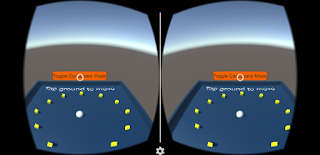
Our Diegetic UI Button

Building for iOS and playing on your iPhone

From Unity we need to create an XCode project:
  1. Open up the Build Settings by going to File > Build Settings.
  2. Select iOS under Platform. After selecting iOS, click the Switch Platform button.
  3. Click Player Settings to open the PlayerSettings panel in the Inspector.
  4. In PlayerSettings, at the bottom under Settings for iOS, click Resolution and Presentation to expand that panel, and set the Default Orientation to Landscape Left.
  5. Click Other Settings to expand that panel and find the Bundle Identifier field. Enter a valid package name for your application (such as com.mycompany.cardboarddemo)
  6. Click Build. This prompts you for a save name, and prepares an XCode project in the [your Unity project]/[your save name] directory.
From XCode we will build the app and put it on your iPhone:
  1. Open XCode. From the File > Open... menu, open the XCode project that you created. It will be a file called Unity-iPhone.xcodeproj inside the directory you just saved under in the last section.
  2. Select the Unity-iPhone project by clicking on it.
  3. In the project menu bar, click on Build Phases to open that section.
  4. Expand the Link Binary With Libraries list.
  5. At the very bottom of the Link Binary With Libraries list, click the + sign. This opens a window that says "Choose frameworks and libraries to add:".
  6. Type Security into the search box. When Security.framework appears, double-click on it to add it to the libraries.
  7. Disable Bitcode by setting Build Settings > Build Options > Enable BitCode to No.
  8. Now run the project, either by clicking the play button, or by going to Product > Run.
If all went well, you should see a "Build Succeeded" and your game launches on your iPhone!

Hope that helped someone!
Ash

Wednesday, October 07, 2015

Web Scraping with Ruby

I was learning a little on how to use Ruby to do some web scraping today, following this article which is admittedly out of date: http://danwin.com/2010/04/coding-for-journalists-go-from-a-know-nothing-to-web-scraper-in-an-hour-hopefully/

I had to make a few edits along the way to fix some bugs and thought I would share. Look for "UPDATE" below.

# --- Get a list of all US Presidents' names, loop through to check for any with last names >6 characters and see if they have died. Calculate the average age for those Presidents ---

# open the required libraries
require 'rubygems'
require 'nokogiri'
require 'open-uri'

# Using nokogiri, fetch Wikipedia's list of presidents page
# UPDATE: Had to use https
list_of_presidents = Nokogiri::HTML(open('https://en.wikipedia.org/wiki/List_of_Presidents_of_the_United_States'))

# Using another nokogiri method, grab the second column (td) from every row (tr), and from those, grab the first hyperlink (a) which should also contain the President's name
# UPDATE: Had to modify XPath to match Wikipedia's current layout
an_array_of_links = list_of_presidents.xpath("//tr/td[2]/b/a[1]")
# UPDATE: I changed the output a little, so used a few different variables
long_name_count = 0 dead_prez_count = 0 alive_prez_count = 0 total_age = 0 an_array_of_links.each do |link_to_test| # This above statement can be read as: for each element in an_array_of_links, do # the following code (until the end line) # And as you go through each element, the variable use to reference the element will be named "link_to_test" # break up the name string by spaces, then get the last element in the resulting array to get the last name last_name = link_to_test.content.split(' ')[-1] if last_name.length > 6 long_name_count += 1 the_link_to_the_presidents_page = link_to_test["href"] # The value of href is going to be something like "/wiki/George_Washington". # That's an address relative to the Wikipedia site # so we need to prepend "https://en.wikipedia.org" to have a valid address...
 # UPDATE: Had to use https
the_link_to_the_presidents_page = "https://en.wikipedia.org"+the_link_to_the_presidents_page # now let's fetch that page the_presidents_page = Nokogiri::HTML(open(the_link_to_the_presidents_page)) # check if they died
 # UPDATE: Had to change this to remove .content for cases where there is no death_date, then change the the 'if' immediately below
death_date = the_presidents_page.xpath("//th[contains(text(), 'Died')]/following-sibling::*")[0]
        if death_date && death_date.content && death_date.content[0]
            # check what their age was
            # UPDATE: Had to change this to add .content and add * to the regex to get all digits of the President's age
age_at_death = death_date.content.match(/aged.+?([0-9]*)/)[1] if age_at_death # we only get here if there was a "Died" table cell AND a text pattern similar to: "aged XX" puts "Age of #{link_to_test.content} is: #{age_at_death}"
                # UPDATE: Had to change to age_at_death.to_i to use the full age, not just a single digit
total_age += age_at_death.to_i # technically, age_at_death is a String. to_i will make it a Number so we can safely add it to total_age dead_prez_count += 1 end else puts "#{link_to_test.content} is still alive" alive_prez_count += 1 end end end puts "Total Presidents: #{an_array_of_links.count}" puts "...with Surname >6 characters: #{long_name_count}, (#{an_array_of_links.count - long_name_count} had short names)" puts "...that have died: #{dead_prez_count}, (#{alive_prez_count} are still alive)" puts "Of dead presidents, their total age is #{total_age} and average age is #{total_age / dead_prez_count}" # OK, we're at the end of the each loop. Go back to the top

Tuesday, April 21, 2015

VR for Beginners: Cardboard, Unity and iOS

Over three years since my last post, so I better make this a useful one!

I've been playing around with various bits of tech recently and wanted to capture some of the finer points as a reminder for myself later and for anyone else out there that is interested. This one will be about VR.

VR & AR appear to be coming back in a big way and could be important "platforms" to consider for all kinds of development in the near future. Since things are taking off but still pretty new, there are a lot of options to look into in terms of devices and SDK's, not a lot of standards, etc. But what if you just want to get started working on some VR content to see how it works, learn some lessons, etc.? What is the cheapest and easiest way to do that? I decided the best option for me was to try using Google Cardboard, weighing up these points:

Pros:
  1. Cardboard kits are cheap. In fact, I got mine for free at GDC 2015.
  2. Google provide SDK's to build Cardboard apps for Android, including a Unity engine version.
  3. There is now a free version of Unity available.
  4. Mobile devices are commonplace and are already an established platform for games.
  5. There isn't much VR content out there right now for mobile devices.

Cons:
  1. Google's SDK's only work with Android devices.
  2. I have an iPhone right now.
  3. I don't want to spend time writing a game engine, but I don't know Unity.
  4. Cardboard isn't as good as more powerful devices, such as the Oculus Rift, so I would need to limit the scope of my demos and learnings, but my time is limited anyway.
So, what was I going to try and do? I wanted to use my existing setup as much as possible and add any extra stuff I needed for free so I could rapidly learn some new skills through experimentation. I wanted to end up with a demo I could have on my phone to show people and maybe put it up on the App Store. What was the list of ingredients I was starting with?
  1. Google Cardboard kit - Already had this for free, luckily.
  2. Unity engine 5.0.1f1 - I was just starting to experiment with this at work anyway. Not a tool I was familiar with, but it had to be easier to learn rather than spend time building my own engine. Note that v5 is pretty new though.
  3. Mac with XCode 6.3 - Just making sure I had the latest version installed.
  4. iPhone 5S - My current mobile phone.
What were the blockers?
  1. Learning Unity.
  2. Finding a Cardboard SDK for Unity (v5) that supported iOS devices.
  3. Starting to build content.
1. Learning Unity
I started out just doing a simple 2D Flappy Birds tutorial to get some familiarity with the toolset, which only takes about 30 mins, plus some extra time to try and do a couple of follow on improvements. It was a little out of date because it was based on Unity 4, but no big deal. I was doing this to help me at work anyway so I would understand what the tools were like when speaking to other engineers that use it in our games.
Then I started looking at a 3D tutorial on the Unity site, Roll-a-ball.

2. Finding a Cardboard SDK for Unity that supported iOS devices
As mentioned, the Google SDK's only support Android devices, but I have an iPhone 5S. So what alternatives did I dig up?
  1. Durovis Dive is another mobile headset adapter; essentially a more premium version of a cardboard device. They have an SDK that supports both iOS and Android handsets from Unity. Unfortunately this is for Unity 4 and I couldn't get it working quickly with my setup. I may get things running in the Unity emulator, but try to export to XCode and things wouldn't build.
  2. There are other devices out there that have SDK's too, but I couldn't be sure they would work with my setup.
  3. While looking through the Durovis forums I noticed some GitHub projects to improve their SDK. They didn't quite fit what I was looking for, since they were still based on the Durovis SDK that wasn't working for me, so I kept looking.
  4. There have been other attempts at porting Cardboard to iOS, but they don't necessarily include Unity support.
  5. Eventually I came across three promising GitHub projects:
    1. CardboardVR-iOS from equinox2k : A port of the Cardboard SDK to iOS, but without the Unity version.
    2. CardboardSDK-Unity from JScott : An updated version of the Cardboard SDK for Unity that adds more input controls, (e.g. being able to hold the magnet trigger down.) But, only for Android.
    3. CardboardSDK-iOS from rsanchezsaez : A port of the Cardboard SDK to iOS, including the Unity version. Doesn't have 100% parity, since there isn't input for Unity at this point, but a great start.
I ended up getting the demos included with CardboardSDK-iOS working on my iPhone last night. It is based on a slightly older version of Unity, so I had to rebuild the XCode project, but the instructions in the ReadMe helped, along with this issue. It is also based on a slightly older version of the Cardboard SDK, but is good enough for me to get started.

Now I'm wondering if there is a way to combine this with CardboardSDK-Unity to get the best of both. I'm not really familiar with Git yet, (I've used other source control systems,) so I'll need to figure that out to see if I can contribute back in some way.

3. Starting to build content
Now to start building stuff! First I'm going to finish up the Roll-a-ball tutorial and then add a VR camera to it. If I get that working, I can share here. I think the main challenge is going to be figuring out how input should work, but that is the point in trying to learn with these experiments! Then I've got an idea for a new, more in depth project that should work within the limitations of a cardboard device, (player in a stationary position, able to look around them with limited input,) but more on that as I get to it.

After that, let's see what happens. Maybe it means getting a more powerful device such as Rift or Hive. Maybe it means looking into what Razer are doing with their open platform.

Anyway, I hope that helps someone out there!

Sunday, January 08, 2012

It seems to be an annual thing for me to come back and write a new post here! The big news this time is that I'm moving back to the US in just two weeks. I'll be working back at EA in Redwood City, CA, still as an Origin Developer Relations Account Manager but now working on US games rather than EU ones. We've announced some but not others, so I'll keep all it under wraps for now. Trust me though, there are some pretty exciting projects in there!

Stuff I've been working on for the past year include the launches of Origin, (as you can probably tell from the name change of our team,) and Battlefield 3. On the side I ported Rack 'Em to the PlayBook using WebWorks and HTML5. It's free, so if you have a PlayBook you can grab it from BlackBerry App World.

My brother was living in the UK last year but has now moved back to Brisbane and launched his T-Shirt site, Cotton Robot. I've been meaning to help with the website, but only done about half of the work unfortunately. Still, go there and buy a shirt!

Other things that happened last year include a visit to the carnival in Brazil, (can't believe that was less than a year ago!) watching Arsenal lose the Carling Cup Final, an away weekend in Manchester to watch Bolton vs. West Ham, a trip through the Florida Keys, the Everglades & NYC, seeing Take That at Wembley and Foo Fighters at the MK Bowl, an Orlando trip, a Coopers 10 year reunion, a tour around Buckingham Palace, some DICE visits, a holiday in Vegas for my Dad's 60th, a supercar racing day, being asked to be Best Man for a friend's wedding this coming Summer and hosting a cracking Leaving/New Years Eve party.

Hopefully this year will be as exciting!

Please help me out! I'm moving back to the US and this stuff won't be making the trip. Wanna buy something? I'll be updating this page as new items are added or things get sold. Thanks Ash

For Sale:

Sold:

Tuesday, January 25, 2011

I said I would post some tips, so here we go with "Getting started with Blackberry Playbook WebWorks SDK for Mac OSX." These are just a few things that caught me out when I was getting started, so hopefully this will help you.

As a bit of background, I'm more familiar with C++ coding on Windows with Visual Studio and more recently using XCode on OSX for iOS apps, so Blackberry and WebWorks was all new to me. I've done web development on both Windows and Mac before, so WebWorks seemed like a good way to get started.

You should follow the getting started guide on the Blackberry website. It makes it pretty simple, but there are a few things that took me a few tries to get right.

First, I needed to install the Adobe Air SDK 2.5. That just means unzipping a download from the Adobe website, but it needs to be unzipped to a path without a space in it. You then choose that folder in the WebWorks installer, which asks where the Air SDK is installed. I kept getting an error along the lines of "incorrect Adobe Air SDK installed" because I had a space in the path at first.

There isn't much to the WebWorks SDK itself, (although there are a few calls you might need, such as detecting a wireless data connection.) You can just make any HTML5 web page in the tool of your choice and it should hopefully work. The main thing you need the SDK for is the compiler, "bbwp."

When compiling apps you need to run bbwp. I was using Terminal to do that and it is much easier to do after adding the path to the bbwp folder to the $PATH environment variable. To do that on OSX you run
sudo vi /etc/paths
in Terminal and add your path, (e.g. "/Users/Ash/bbwp".)
You can then open a folder in Terminal which contains a zip file of the app's source and run "bbwp my.zip" which will create "/bin/my.bar".

Then you need to deploy the .bar file to the Playbook simulator. Here is an example command to deploy a compiled bar:
./blackberry-deploy -installApp -password ***** -device ***.***.***.*** -package /Users/Ash/Downloads/Blackberry/bin/sketchPadStandard.bar
In that example I haven't added the blackberry-deploy executable's path to $PATH, so I had to add ./ to the beginning and run it from:
/Users/Ash/bbwp/blackberry-tablet-sdk/bin
You get the device's IP address and set a password for the tablet by enabling developer mode in the device's settings, then clicking the hammer on the home screen.

After getting my environment setup one evening after work, I managed to build a functional app in one day that weekend, (with a bit of help from w3schools.com to help me brush up on my HTML5 and JavaScript skills.) I've just been adding a bit of polish while I wait for my Blackberry developer account to be approved, then I should be submitting asap!

I hope that helps! Let me know your tips in the comments section below.

Monday, January 24, 2011

Again, a year since the last update, apart from that little blip moving servers.
  • Lotsa Dots is now available from the iTunes App Store! iTunes Worldwide. More news on that via Twitter, @Lotsa_Dots
  • Work is OK, with lots of changes happening at the moment. I've worked on several big launches over the last year, not least of which Need for Speed: Hot Pursuit with the brilliant Autolog features. Bulletstorm and Shift 2 Unleashed up next.
  • I've been working on Blackberry PlayBook apps this week in my spare time. I'll probably post up some tips on that soon.

Monday, March 29, 2010

Blogger shutdown their FTP publishing service, so this blog is now located on their servers, which you can get to using http://blog.hiash.com/.
You will be automatically redirected in 30 seconds or you may click here.

For feed subscribers, please update your feed subscriptions to
http://blog.hiash.com/feeds/posts/default.

Thursday, January 07, 2010

Knocking on for another year since the last update.
  • The wedding was great: LouiseAndAshGetMarried.com.
  • Travel Companion is now available from the iTunes App Store! iTunes USA, iTunes UK, iTunes Worldwide
  • Work is OK. The next big launch is Battlefield Bad Company 2. Battlefield 1943 went down a storm, so here's hoping BFBC2 does too.
  • Once again, I'm off to San Francisco soon for a business trip. It's the first one since my last post I think.
  • I've been playing a lot more games recently, (I got a PS3 for Christmas in the Black Friday sales,) which is a good thing, except it eats away hours from other stuff.

Sunday, April 26, 2009

It is getting on for a year since the last update.

  • The wedding is coming up very soon. I think we are there or there-abouts with the planning.

  • Rack 'Em is now available from the iTunes Store! Expect more soon.

  • I was named in the Develop 30 Under 30 list

  • Work is going well. I'm very busy and have launched several titles recently, notably Battleforge, Burnout Paradise Ultimate Edition, Family Game Night and others I can't think of right now.

  • I'm off to San Francisco soon for a business trip, so I'm looking forward to that. I haven't seen Joe and the others since Thanksgiving last year when I went out to SF for a couple of days since I was half way there in Orlando. I fell asleep at Oakland Airport while waiting for my return flight that time, which was a bad thing since I missed it...

  • I feel like I haven't played a game in ages...

Tuesday, June 10, 2008

My Xbox 360 came back ages ago, but it has been almost two months since I updated this blog. Seems to be working fine. I've been playing lots of GTA4 and finished the story mode last week. I have dabbled with a little Battlefield: Bad Company too, which has my name in the credits! DICE sent over a care package with a few free copies to say thanks for helping, which was nice of them.
Since the last update I have been to the Wii Summit 08 and Sony DevStation 08 conferences. I have a ticket booked for the XNA Gamefest 08 in two weeks time as well. It will be interesting to compare swag, especially since the attendance fees differ so wildly. Nintendo's was free and main gift was a laptop bag. Sony's was €50 and I got a PlayStation Eye and Spiderman Trilogy Blu-Ray gift set. Microsoft's is around £200, so that may get me a free Xbox 360?
I have been away to Tennessee for Louise's mum's 50th. It was actually a lot of fun and something I would probably never have done otherwise. We went to see Graceland, Jack Daniel's Distillery and the Grand Ole Opry, amongst other things, (like shopping.)
I started up a new project of playing a new game demo each workday, (that I can,) and recording my impressions on a website cleverly titled Demo per Day. It is a quick way for me to expose myself to new gaming experiences, catch up with old games that passed me by, (even if it is just a taste,) and perhaps gain a useful knowledge into a gaming industry niche.
It is my 25th birthday this weekend. I need to deal with my early mid-life crisis.

Sunday, May 25, 2008

If anyone out there was getting spam supposedly sent from HiAsh.com I apologize. It seems to mostly be coming from Russia, but I've worked with my host to try and prevent it in future. I was getting hundreds of bounced mails back to me each day which was my main clue into what was going on. So, sorry for any spam but it wasn't me and was just as annoying on this end!
I've been having a lot more ideas for new websites, other projects and potential products recently. Limited amounts of time mean I can't do all of them unfortunately. I'm still slowly working on one and have now started another that I hope to work on each day at lunch times. I'll post more when they are further along.
One idea that struck me a couple of months ago thought is "why not have a Guitar Hero controller as a real instrument?" Right now it could be achieved through software. We already have Frets on Fire, which I guess has an editor, (Guitar Hero 4 was announced this week with a built in band jam-session mode,) but why not have an instrument that is basically the same as a Guitar Hero/Rock Band controller but works in the same way as an electric keyboard? Also, sheet music has been around for hundreds of years and there must be good reason why that is so, but surely there must have been other ways of noting down music before now? Why not have Guitar Hero-like tabs be the new documentation format for music on real instruments, such as drums? There is no reason we need to have sheets for music any more. We could just as easily build an LCD screen into a piano these days, for instance.
I was interviewed and got a mention on the Full Sail graduate news website. I also got myself a nice little promotion at work this week!
Louise and I went to Paris for the weekend last month. It was actually much better than I thought and we had a great time. We went over on the Eurostar and grabbed tickets for an open top bus tour, jumping on and off wen we saw something interesting. We also spent one day at Euro Disney and the Disney Studios which I surprisingly enjoyed.
Louise's sister, working on the Oriana, docked in Southampton a few weeks ago so we went down to visit and had a quick tour of the ship. I was on the maiden voyage of it years ago, so it seems much smaller and tattier now. Makes me interested in doing another cruise though since it has been a few years since the last one.
This weekend we have been visiting more of Louise's family and got lucky with the weather. I'm a little sunburnt though. If it is still nice tomorrow, seeing as how it is a bank holiday, I might pop over to the driving range I visited last weekend. It was nice to hit a few balls again.
My Xbox 360 made it to EA in San Francisco but then sat in their mailroom for more than a week since they couldn't see a name on it to deliver it to. After chasing that up it has been sent on and was with Microsoft at the end of this week. Word is I may have it back sooner than I thought, (which is great, but annoying that a week was wasted already.)

Sunday, May 11, 2008

On Wednesday I suffered the death of a friend... my launch day Xbox 360. I wanted to capture the process I went through with getting it replaced since its a slightly different case to most. I have a US 360 from my time living there, but right now I'm back in the UK with it. Would I totally blow Microsoft's mind?
I called the UK MS helpdesk about my Xbox the day it was dying, (system would hard lock after a min or two with graphical glitches on the screen. It may or may not restart, depending on how long I left it to cool.) First thing they said was it wasn't in warranty because it wasn't a RRoD, even though it was clearly heading that way, so I would have to pay, but they couldn't say how much it was because it depended on what was wrong. I made it clear that I had a US 360 and I expected a US 360 returned to me, (since I doubt I'm getting the same Xenon back. I expect a new model.) Anyway, he makes me go through the process of removing all the cables and putting it back together etc. and it then booted, (but then it was doing that before, you just needed to wait a min...) so he said call back if I was still having problems. It was clearly broken but I left it for the night.
The next day I tried it and it was an instant RRoD, which is pretty lucky really. I went to work and asked if there were any way I could speed this up through EA. They told me they call the same number I would. Fine, so I called the helpline again with the reference number they gave me the night before. I go through all the bullshit of getting the return setup and just before they hit OK I say, "You know this is a US system and I expect a US system back, right?". "Err, we'll take it and fix it but you'll get a PAL system back, OK?" No its not fucking ok, what use is that to me? So they cancel everything and I'm told to call the US. One thing to note is that they were going to email me a postage label, then I would have to package up the Xbox myself and call UPS to come and collect it.
So I wait a few hours for the US line to open and call them. Their automated line robot is a piece of crap but luckily I had seen an article a couple of days before with a different number to call to get straight to a human, as long as you had a case reference number. So I call that and they tell me they will fix it, and its all free now that it is RRoD, but they need a US address. Their process is to mail out a pre-paid postage box for me to put the Xbox in and mail out. Then when it is fixed they mail it back to that address. That obviously isn't going to work for me and the guy understands the situation so tries to help out. I ask if I can save some time and just mail it to them myself and then I'll find a US address of someone that can return it to me in the UK when it is done. They say that is fine but I'll be covering the postage myself. OK, thats cool, but let me check how much that postage is. It ends up at around £80 with UPS, just to send it one way. Great, so I need a US address and will be paying ~$300 to mail it both ways. That's not far short of a new 360.
I ended up using one of the admins in the Redwood Shores office as a US address. I mailed the Xbox to them on Friday and Microsoft have sent their box to the same person. Let see how long this all takes. The repair time was estimated at 2 to 3 weeks by the UK helpdesk. Add a week either side for mailing to/from the US and another week for mailing within the US and I would say that means mid-June.
So, a mixed start. I hate being told one thing that ends up being a total lie. What if I had sent it to get fixed in the UK because that first bloke said it would be fine? But then the assistant in the US tried to be as helpful as possible.

Sunday, April 06, 2008

It has been a couple of months since the last post, but I put that down to being fairly busy. Louise and I have been trying to arrange the wedding and so far have close to 70 people confirmed coming away with us to Barbados for the ceremony. It is amazing how quickly time passes though, (it will only be a year away soon.)
I flew out to Vancouver for an Online Summit, internal to EA, and had to present a summary of some of the more interesting products EA had shipped with online functionality this year. Most of the rest of the time was spent listening to what other groups within the company have been working on and it was interesting to hear. At the weekend a few of us went up to Whistler which was a great place to ski. Unfortunately I only had one day of it due to illness, so I'll have to go back one day.
Easter weekend Louise and I flew out to Portugal to meet up with my parents to try and catch some sun. We got a little, but it was cold in the evenings.
I went back to DICE again on Friday and had a good trip. We flew out of the brand new Heathrow Terminal 5 which opened with many problems last week. It seemed fine to me now after a settling period. The odd unfinished lamp post, some staff that didn't know what they were talking about and some odd layout decisions, but pretty nice overall. As for DICE itself, the projects coming out of there look great. Battlefield Heroes looked especially impressive and will be launching to a closed beta very shortly. I've been playing the Battlefield: Bad Company beta on Xbox 360 too, and I think its pretty fun. It has definitely raised my interested and impressions of the game so will be picking that up when it appears.
I've filed my US taxes but had them returned to me because I forgot a form. Hopefully that will all be sorted quickly so I can get my nice little rebate payment sent to me.
It is performance review season again right now at work and I think I have done well again this year. I have submitted my review and I'm hoping for good things from the meeting with my manager in a few weeks.
Chris is back from his Asia tour soon, which has now included a month in the US. I think he is in San Francisco at the moment and I would love to be there with him right now to catch up with him and my friends. I'm hoping for a trip out there soon, but there has been no mention.
Thanks to my Dad and Dagenham & Redbridge I went to the Carling Cup Final at the new Wembley Stadium in which Tottenham beat Chelsea. After seeing things from a regular punter's point of view at the England game it was quite a contrast to see the fancy part of the stadium. I was fed in a fancy hall along with the players from both teams that were not playing that day and had a cushioned seat. Not bad at all.
I'm trying to finish up some games so I can get to others. I'm rushing through Mario Galaxy right now and want to get to Burnout Paradise next before GTA4 comes out.
I finally got my tools out and laid a new floor in our hallway. Its too much like hard work... all that bending and kneeling. My frail computer geek physique can't take it.
Randomly it is snowing here today. Crazy English weather.

Sunday, December 30, 2007

Sometimes I make notes for myself on what to write for then next update for my blog. I haven't done that this time, so I totally forget what has happened.
Obviously it is Christmas at the moment. I decided to finally propose to Louise on Christmas Eve, so it will be non-stop planning for the next 18 months or so.
As for other stuff, I know I have been back to Stockholm to help out at DICE. I know we had our Christmas party, (boring after last year... just a lunch.) I know that EVERYONE loves to play the Wii, so much that even my Dad and Mother-in-law-to-be now have one. I went to see I Am Legend and went away impressed. Chris got us tickets to go and see Jimmy Carr at the Hammersmith Apollo which was pretty good, (I had heard a fair amount of the act but a lot of audience participation made it funnier.) Chris has gone off to Asia for a few months now, but we'll see how long his money lasts :)
After listening to others playing loudly near my desk for three days straight, I tried out Rock Band at work and it is a lot of fun. The drums were tough, but whatever instrument you play you have a great time. Although you are just making crappy clicking noises you are hit with the great sound of the real track so it makes you feel like a bad-ass, really playing.
I can't think of much else, so I'm going to get back to working on one of my projects.

Sunday, November 04, 2007

I've been on a trip back to EA in San Francisco a couple of weeks ago. It was great to catch up with people there and, more importantly, I also found out that I have my first ever credit in a game! Take a look at this image from Medal of Honor: Airborne:

I picked up a copy for the PC, but so far I've pretty much only been to the credits section. I've got too many games to play at the moment and nowhere near enough time. I've been told I'll also have my name in Need for Speed: ProStreet, due this month.
I can't think of much else worth mentioning that has happened in the past few weeks. I did get to go to the England vs Estonia Euro 2008 qualifier at the new Wembley Stadium which was pretty cool. I didn't get to see the plush part of the stadium with the bars and restaurants though so in some ways it was underwhelming. The view when you step out of Wembley Park station is something special though. Luckily we were sitting at the end where all the goals were scored in the first half, though it was probably all for naught since we are unlikely to qualify for the tournament now.
I am supposed to be going back to DICE in a couple of weeks so it looks like I really am going to be doing a fair bit of traveling in this job.

Monday, September 17, 2007

Another long gap, but oh well. Louise and I are now back in the UK and have setup our little house. We've not explored Guildford too much yet since we keep going back and forward to Essex for various reasons.
Work is going ok. It's a little quieter here since most of the action is in the US, so I get to concentrate on what I'm doing a bit more, though new stuff gets dumped on me over night.
I got to go to DICE, who work on the Battlefield franchise, based in Stockholm two weeks ago. That was a pretty cool trip and I got to see the new games coming up and help out, (a little,) in planning them.
Just before I went it was Louise's birthday and I bought us both tickets to We Will Rock You. To be honest, I wasn't very impressed but it was something I wanted to try and can tick off my list.
I was given a copy of Bioshock from Mum which I managed to finish in three sessions. It was that good a game, I only stopped each time because something else came up :) Louise was in Paris visiting DisneyLand, so I made the most of the alone time with the computer. I also caught up with some buddies from Plymouth at a house warming over the weekend too. It was good to see them.
Nothing else jumps to mind, so I'm just going to throw up a few links here:
-Facebook
-LinkedIn
-MySpace

Tuesday, July 24, 2007

Wow, this has been a long gap and much has happened. I'm just going to quickly rattle some of these things off:
It seems like ages ago, but was only about a month since Louise and I went back to England for a weekend. I saw my mates, made a visit to EA UK, (nice office, good meeting,) and went house hunting. We found a place and completed the purchase last week, so now we are Homeowners!
We've had a few other trips too. We went to Sonoma Valley, the wine country a little north of San Francisco. Unbelievably I actually liked some of the wines and I learnt what to look for.
We went to go and see Jersey Boys at the theatre which was surprisingly good. It means that I'm more likely to check out some other shows that I would otherwise skip when we get back.
We were here for July 4th and went to watch the fireworks over the bay by the Golden Gate Bridge.
This past weekend the two of us flew out to Vegas. I spent most of the time with my friends from Full Sail who all converged to meet up for a few days on the beer. While we were there Louise and I took a wander around the Bodies exhibit which was a very strange thing to see, but very interesting too, (FYI: if you go, skip the audio tour; its rubbish.)
We have seen Live Free or Die Hard which was a brilliant action movie, (though way over the top, where the other Die Hards were a bit more believable.) We also got free tickets to an early screening of Harry Potter: OotP since EA makes the game of the movie. It was OK, but was an obvious middling movie since there was no real end... just stuff that happens that leads towards the final movie/book. On Friday we get free tickets to see the Simpsons movie too!
Friday is also my last day in the office here and we head back next week. Wow, that year went fast!

Monday, June 04, 2007

Dad and Chris flew back to England over the weekend after being here for two weeks. The four of us, (including Louise,) went to the Hawaiian island of Oahu for Memorial Day weekend, (Honolulu, Waikiki beach.) It was a fun trip; Chris and I tried surfing, we went snorkeling with sea turtles and took a helicopter flight around the island where we saw the valleys they filmed Lost and Jurassic Park. We also saw Shrek 3, which turned out to not be as funny as previous installments. It needed more Donkey :)
Louise and I have still been playing golf. We have finished our lessons now so we have just been going out on a 9-hole course to practice. Neither of us can drive very far so I've ended up double bogeying on each hole, but thats not a bad target after only a couple of games.
Work is going OK. I went on the trip to Canada and learnt a lot there. I've gone through my first annual review and gotten a nice little raise. Its only two months now before I am back home working out of the UK.
Speaking of which, we are both flying home next weekend, (15th June,) because of an issue with Louise's visa which came up when she came to visit me in Canada. Make sure the red carpet is rolled out. Hopefully it will give us a chance to check out the Guildford area so we know where we will be living once we get back.
Finally, congratulations to Steve who managed to tie with me in the Fantasy Premiership game. It is pretty unbelievable that we got all the way through the season and ended up on the same score.